25像素重映射

把像素点P(x,y)重新映射到一个新的位置P’(x’, y’)

像素重映射函数

cv.remap(src, map1, map2, interpolation[, dst[, borderMode[, borderValue]]] ) ->dst

​ •src表示图像

​ •map1表示x,y方向映射规则,或者x方向映射

​ •Map2如果map1表示x,y映射时为空,否则表示y

​ •表示映射时候的像素插值方法 支持:INTER_NEAREST 、NTER_LINEAR 、NTER_CUBIC

1
2
3
4
5
6
7
8
9
10
11
12
13
14
15
16
17
18
19
20
21
22
23
24
25
26
27
28
29
30
31
32
33
34
35
36
37
38
39
#25像素重映射
def remap_demo():
image = cv.imread("123.jpg")
cv.namedWindow("remap-demo", cv.WINDOW_AUTOSIZE)
cv.createTrackbar("remap-type", "remap-demo", 0, 3, trackbar_callback)
h, w, c = image.shape
cv.imshow("input", image)
map_x = np.zeros((h, w), dtype=np.float32)
map_y = np.zeros((h, w), dtype=np.float32)

while True:
pos = cv.getTrackbarPos("remap-type", "remap-demo")
if pos == 0: # 倒立
for i in range(map_x.shape[0]):
map_x[i, :] = [x for x in range(map_x.shape[1])]
for j in range(map_y.shape[1]):
map_y[:, j] = [map_y.shape[0] - y for y in range(map_y.shape[0])]
elif pos == 1: # 镜像
for i in range(map_x.shape[0]):
map_x[i, :] = [map_x.shape[1] - x for x in range(map_x.shape[1])]
for j in range(map_y.shape[1]):
map_y[:, j] = [y for y in range(map_y.shape[0])]
elif pos == 2: # 对象线对称
for i in range(map_x.shape[0]):
map_x[i, :] = [map_x.shape[1] - x for x in range(map_x.shape[1])]
for j in range(map_y.shape[1]):
map_y[:, j] = [map_y.shape[0] - y for y in range(map_y.shape[0])]
elif pos == 3: # 放大两倍
for i in range(map_x.shape[0]):
map_x[i, :] = [int(x/2) for x in range(map_x.shape[1])]
for j in range(map_y.shape[1]):
map_y[:, j] = [int(y/2) for y in range(map_y.shape[0])]

dst = cv.remap(image, map_x, map_y, cv.INTER_LINEAR)
cv.imshow("remap-demo", dst)
c = cv.waitKey(100)
if c == 27:
break
cv.destroyAllWindows()

26图像二值化

图像二值化定义

•只有两个像素值0、1(0表示黑色,1-255表示白色),黑色表示背景,白色表示对象(规则)

图像二值化方法

•cv.mean,计算灰度图像均值m

•inRange方法分割

二值化函数

cv.threshold(src, thresh,maxval, type[,dst]) ->retval, dst

src表示输入图像

thresh表示阈值

maxval表示最大值

type表示 二值化THRESH_BINARY 或者 二值化反THRESH_BINARY_INV

retval表示返回阈值,dst返回的二值图像

1
2
3
4
5
6
7
8
9
10
11
12
13
14
15
16
17
18
# 26图像二值化
def binary_demo():
image = cv.imread("123.jpg")
gray = cv.cvtColor(image, cv.COLOR_BGR2GRAY)
cv.imshow("gray", gray)

# 手动阈值,二值化
ret, binary = cv.threshold(gray, 127, 255, cv.THRESH_BINARY)
cv.imshow("binary",binary)
cv.waitKey(0)

# 求均值,二值化
m = cv.mean(gray)[0]
ret, binary = cv.threshold(gray, m, 255, cv.THRESH_BINARY)
cv.imshow("binary", binary)
cv.waitKey(0)

cv.destroyAllWindows()

27全局与自适应二值化

全局二值化

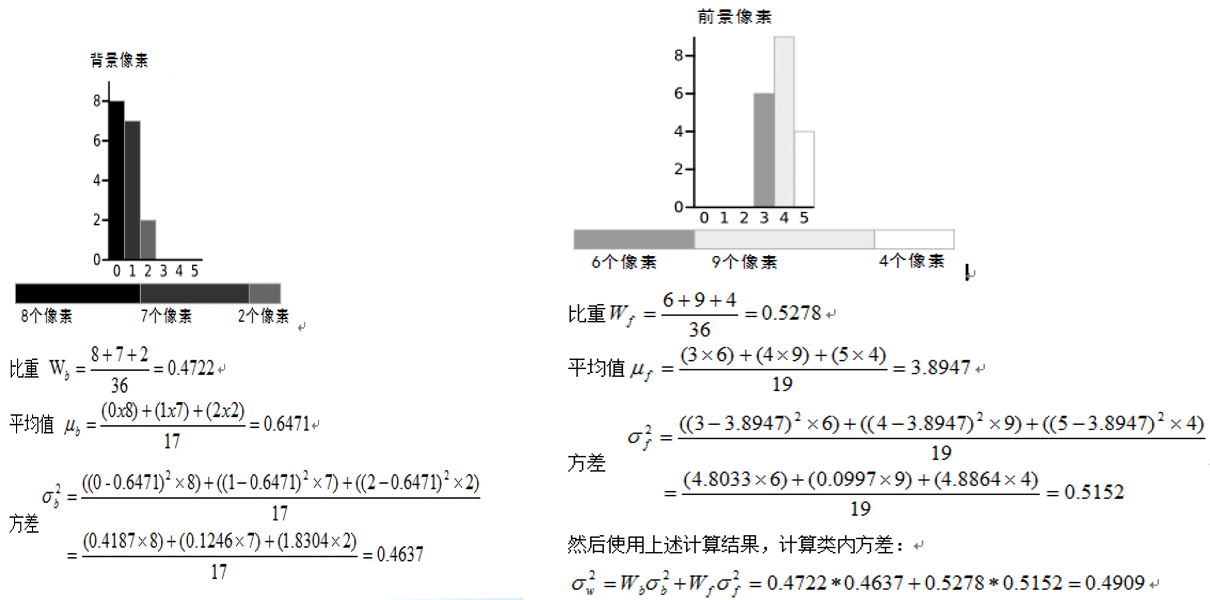
(1)大津法(针对两峰):0~5六个灰度级别,根据直方图分布,以每个灰度等级分割直方图分布为两个部分,分别求取均值跟方差,如图示,最小方法差和对应的灰度值为,分割阈值.
(2)三角法(针对单峰)
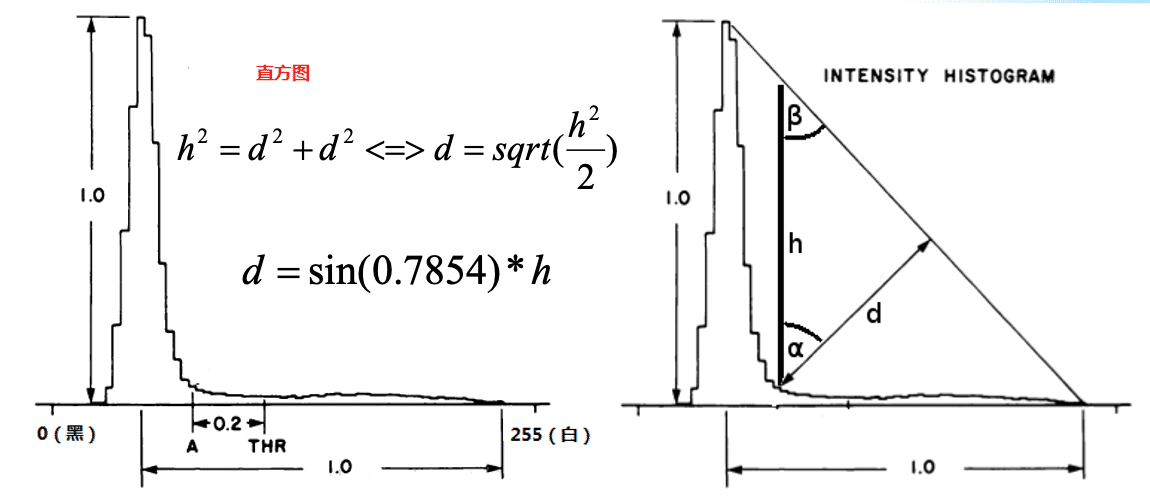
α和β角都为45°,最长的d对应的点偏移0.2即为阈值点。

两种方法都是基于直方图分布

全局二值化函数

cv.threshold(src, thresh,maxval, type[,dst]) ->retval,dst

​ •type表示二值化

​ •THRESH_BINARY | THRESH_OTSU 全局自动阈值+二值化(大津)

​ •THRESH_BINARY | THRESH_TRIANGLE 全局自动阈值+二值化(三角)

​ •THRESH_BINARY_INV | THRESH_OTSU

表示不同的全局二值化方法

自适应二值化

模糊图像 D(可以为均值模糊/高斯模糊)

原图S + 加上偏置常量C

T = S –D > -C ? 255 : 0

自适应二值化函数

cv.adaptiveThreshold(src, maxValue, adaptiveMethod, thresholdType, blockSize, C[,dst] ) ->dst

​ •cv.ADAPTIVE_THRESH_MEAN_C 均值

​ cv.ADAPTIVE_THRESH_GAUSSIAN_C 高斯

​ •blockSize必须为奇数

​ •C表示要减去的权重,可以是正数,负数,0

1
2
3
4
5
6
7
8
9
10
11
12
13
14
15
16
17
18
19
20
21
22
# 27全局与自适应二值化
def binarier_demo():
image = cv.imread("123.jpg")
gray = cv.cvtColor(image, cv.COLOR_BGR2GRAY)
cv.imshow("gray", gray)

# 手动阈值,大津法
ret, binary = cv.threshold(gray, 0, 255, cv.THRESH_BINARY | cv.THRESH_OTSU)
cv.imshow("binary1", binary)
cv.waitKey(0)

# 手动阈值,三角法
ret, binary = cv.threshold(gray, 0, 255, cv.THRESH_BINARY | cv.THRESH_TRIANGLE)
cv.imshow("binary2", binary)
cv.waitKey(0)

# 自适应法
binary = cv.adaptiveThreshold(gray, 255, cv.ADAPTIVE_THRESH_GAUSSIAN_C, cv2.THRESH_BINARY, 25, 10)
cv.imshow("binary3", binary)
cv.waitKey(0)

cv.destroyAllWindows()

28实时人脸检测

OpenCV4 DNN模块

•来自另外一个开源项目tiny dnn

•OpenCV3.3正式发布

•最新版本OpenCV4.5.5

•支持后台硬件加速机制 CPU/GPU等

•支持多种任务(分类、检测、分割、风格迁移、场景文字检测等)

•只支持推理(模型部署),不支持模型训练

•支持主流的深度学习框架生成模型,OpenCV加载

•推荐使用pytorch/tensorflow

OpenCV人脸检测支持演化

•OpenCV3.3之前基于HAAR/LBP级联检测

•OpenCV3.3开始支持深度学习人脸检测

•支持人脸检测模型caffe/tensorflow

•OpenCV4.5.4 支持人脸检测+landmark

•模型下载地址:

https://gitee.com/opencv_ai/opencv_tutorial_data

DNN相关函数

•读取模型:readNetFromTensorflow

•转换为blob对象:blobFromImage

•设置输入:setInput

•推理预测:forward

人脸检测显示

•模型输入:1x3x300x300

•模型输出:1xN(张人脸)x7(个数据)

​ 人脸检测框坐标(左上右下) – 后面四个值

​ 预测置信度(score) – 第三个值

​ class_id(类别) – 第一个值

1
2
3
4
5
6
7
8
9
10
11
12
13
14
15
16
17
18
19
20
21
22
23
24
25
26
27
28
29
30
31
32
33
34
35
36
37
38
39
40
41
42
43
44
45
46
47
48
49
50
51
52
53
54
55
56
57
58
59
60
61
62
63
64
65
66
67
68
69
70
71
72
73
74
75
76
77
78
79
80
81
82
83
84
85
86
87
88
89
90
91
92
93
94
95
96
97
98
99
100
101
102
103
104
105
106
# 人脸检测
#下载下面两个模型到项目地址(https://gitee.com/opencv_ai/opencv_tutorial_data)
model_bin = "opencv_face_detector_uint8.pb"
config_text = "opencv_face_detector.pbtxt";

# 视频人脸检测
def video_detection():
font = cv.FONT_HERSHEY_SIMPLEX
font_scale = 0.5
thickness = 1

#load tensorflow model
net = cv.dnn.readNetFromTensorflow(model_bin, config=config_text)
capture = cv.VideoCapture(0) #获取摄像头图像
# 人脸检测
while True:
e1 = cv.getTickCount()
ret, frame = capture.read()
frame = cv.flip(frame, 1)
if ret is not True:
break
h, w, c = frame.shape
blobImage = cv.dnn.blobFromImage(frame, 1.0, (300, 300), (104.0, 177.0, 123.0), False, False);
net.setInput(blobImage)
cvOut = net.forward()
print(cvOut.shape)

# Put efficiency information
t, _ = net.getPerfProfile()
label = 'Inference time: %.2f ms' % (t * 1000.0 / cv.getTickFrequency())

# 绘制检测矩阵
for detection in cvOut[0, 0, :, :]:
score = float(detection[2])
objIndex = int(detection[1])
if score > 0.5:
left = detection[3] * w
top = detection[4] * h
right = detection[5] * w
bottom = detection[6] * h

# 绘制矩形框
cv.rectangle(frame, (int(left), int(top)), (int(right), int(bottom)), (255, 0, 0),thickness=2)

# 绘制类别跟得分
label_txt = "score: %.2f"%score
(fw, uph), dh = cv.getTextSize(label_txt, font, font_scale, thickness)
cv.rectangle(frame, (int(left), int(top) - uph - dh), (int(left) + fw, int(top)), (255, 255, 255), -1, 8)
cv.putText(frame, label_txt, (int(left), int(top) - dh), font, font_scale, (255, 0, 255), thickness)

e2 = cv.getTickCount()
fps = cv.getTickFrequency() / (e2 - e1)
cv.putText(frame, label + (" FPS: %.2f"%fps), (10, 50), cv.FONT_HERSHEY_SIMPLEX, 1.0, (0, 0, 255), 2)
cv.imshow('face-detection-demo', frame)
c = cv.waitKey(1)
if c == 27:
break
cv.destroyAllWindows()

# 图片人脸检测
def image_detection():
font = cv.FONT_HERSHEY_SIMPLEX
font_scale = 0.5
thickness = 1

#load tensorflow model
net = cv.dnn.readNetFromTensorflow(model_bin, config=config_text)
capture = cv.VideoCapture(0)
# 人脸检测
e1 = cv.getTickCount()
frame = cv.imread("face.png")
h, w, c = frame.shape
blobImage = cv.dnn.blobFromImage(frame, 1.0, (300, 300), (104.0, 177.0, 123.0), False, False);
net.setInput(blobImage)
cvOut = net.forward()
print(cvOut.shape)

# Put efficiency information
t, _ = net.getPerfProfile()
label = 'Inference time: %.2f ms' % (t * 1000.0 / cv.getTickFrequency())

# 绘制检测矩阵
for detection in cvOut[0, 0, :, :]:
score = float(detection[2])
objIndex = int(detection[1])
if score > 0.5:
left = detection[3] * w
top = detection[4] * h
right = detection[5] * w
bottom = detection[6] * h

# 绘制矩形框
cv.rectangle(frame, (int(left), int(top)), (int(right), int(bottom)), (255, 0, 0), thickness=2)

# 绘制类别跟得分
label_txt = "score: %.2f" % score
(fw, uph), dh = cv.getTextSize(label_txt, font, font_scale, thickness)
cv.rectangle(frame, (int(left), int(top) - uph - dh), (int(left) + fw, int(top)), (255, 255, 255), -1, 8)
cv.putText(frame, label_txt, (int(left), int(top) - dh), font, font_scale, (255, 0, 255), thickness)

e2 = cv.getTickCount()
fps = cv.getTickFrequency() / (e2 - e1)
cv.putText(frame, label + (" FPS: %.2f" % fps), (10, 50), cv.FONT_HERSHEY_SIMPLEX, 1.0, (0, 0, 255), 2)
cv.imshow('face-detection-demo', frame)
c = cv.waitKey(0)
cv.destroyAllWindows()